


IPFS versus HTTP: the future of a decentralised internet?
Key points
- IPFS (InterPlanetary File System) is a communications protocol for a distributed file system, pitched as a replacement for the internet’s HTTP protocol. Content on IPFS is stored not on one server but across a network of nodes.
- IPFS is a key Web3 infrastructure layer, enabling decentralised data storage for a range of dapps, including NFT, GameFi and DeFi.
- Over time, IPFS could reshape how data are stored and accessed online, addressing censorship and the dominance of popular cloud platforms run by Google, Amazon, Alibaba, Microsoft and other tech giants.
How IPFS differs from HTTP
IPFS (InterPlanetary File System) is an open-source hypermedia communications protocol through which computer nodes store and distribute data in a single distributed file system.
The key difference from HTTP is that IPFS retrieves data not by a site’s location but directly by the address of its content (a file, document, image or folder).
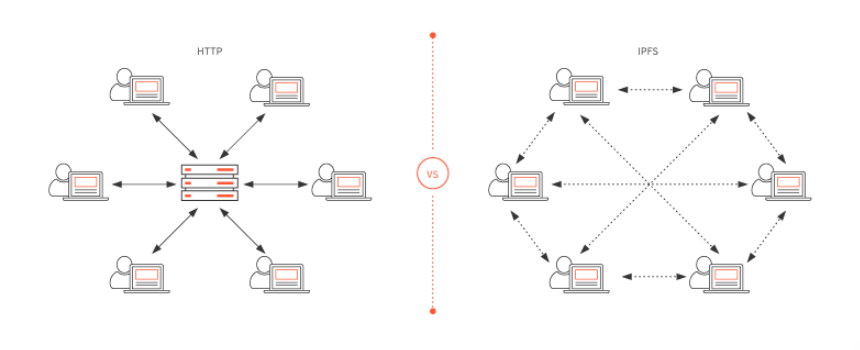
The storage structure in IPFS is decentralised, which helps counter censorship. The system’s creator, Juan Benet, founder and head of Protocol Labs, has called IPFS a “distributed permanent web,” meaning that a site hosted on the system cannot be shut down.
“In some sense IPFS is like the Internet, but you can view IPFS as a single BitTorrent swarm exchanging objects in one Git repository. In other words, IPFS presents a high-performance block storage model with content-addressed hyperlinks,” he explained in the project’s white paper.
In IPFS, addresses point to files or data derived from the content itself using hashing. This allows website content on IPFS to be moved and accessed in a decentralised, peer-to-peer manner.
Put simply, IPFS is akin to a torrent tracker in which a number of nodes (computers) freely share the files they host, propagating them across the network for open access.
Thus IPFS tackles HTTP’s weaknesses, which routes traffic through centralised servers—adding cost and creating the risk of mass outages if a server fails. IPFS lets nodes fetch and serve files from many peers at once rather than a single server. When a user requests a file, the IPFS network finds nodes holding the required hashes and retrieves the data.
Who built IPFS, and when
IPFS was created by Protocol Labs founder Juan Benet. The technical documentation for the new file system appeared in July 2014.
The protocol’s first release came in February 2014. In September 2015, the first major site to use the IPFS distributed web was the free web host Neocities, which lets users create mini-sites on its platform.
The next milestone was Filecoin’s $257m ICO. The sale took place on Coinlist, founded by Protocol Labs together with AngelList. As the developers noted at the time, Filecoin aimed to create economic incentives for IPFS users via cryptocurrency.
In June 2019, Protocol Labs organised the first IPFS event in Barcelona, which led to collaboration with Netflix as well as with Opera, Microsoft and Cloudflare.
An equally important milestone was the mainnet launch of Filecoin in October 2020. According to Protocol Labs, this established a layer of IPFS adoption with built-in economic incentives.
How IPFS works — a closer look
When content is uploaded to IPFS, the address for accessing an object, file or user data is tied not to a server address (an IP address) but to a unique cryptographic hash identifier called a Content Identifier (CID).
Re-uploading the same file does not change its CID; updated versions receive new hash identifiers. To access earlier versions, IPFS uses the InterPlanetary Naming System (IPNS) — an analogue of the DNS registry.
IPFS files larger than 256 KB are split into chunks, hashed and organised into IPLD objects (InterPlanetary Linked Data). IPLD comprises two components: the data themselves and links to the file’s parts, tied together via a Merkle DAG (a directed acyclic graph of Merkle trees).
A special programme, the IPFS daemon, then handles communications. It temporarily caches data or “pins” them by user choice, serving them to other nodes on request. Such nodes can go on to act as content providers or remain consumers.
When content is requested, the system’s Distributed Hash Table (DHT) is used to find nodes near the requester that hold copies of the data. Those nodes return the file’s chunks.
Where IPFS is used
According to BuiltWith, as of 5 October 2022 around 6,500 sites worldwide use IPFS, with just under a third in the United States. The list includes the Uniswap decentralised exchange, the dapp data service Dapp Radar and the crypto-startup platform DAO Maker.
The first web resource with IPFS support in 2015 was the hosting service Neocities. Cloudflare began using IPFS in 2018 and launched its own gateway in 2022. In March 2020, the Opera browser enabled access to Unstoppable Domains’ decentralised resources by hosting content on IPFS. In early 2021, the protocol was integrated into the Brave crypto browser.
IPFS has also been deployed as a response to regulator-led censorship. The first example was the upload of the Turkish edition of Wikipedia to IPFS. In spring 2019, activists uploaded the WikiLeaks archive to IPFS after Julian Assange’s arrest.
IPFS is used to host code, too. The team behind the Uniswap decentralised exchange, for example, hosts its interface on IPFS.
It also serves as a crucial Web3 infrastructure layer supporting NFT projects, dapps and other services. Specialist firms now offer file-management services for IPFS. For instance, Pinata helps monetise media for NFTs issued across multiple blockchains, including Ethereum, Solana, Polygon, Avalanche and Algorand.
How to open an IPFS link
Popular browsers such as Opera and Brave already offer native support for IPFS links. This means you can open sites using addresses with the ipfs:// prefix, for example:
ipfs://bafybeiaysi4s6lnjev27ln5icwm6tueaw2vdykrtjkwiphwekaywqhcjze/wiki/
In Google Chrome, however, such a link will not open. Instead, you must use HTTPS together with the address of a gateway hosting the file, for example:
https://ipfs.io/ipfs/bafybeiaysi4s6lnjev27ln5icwm6tueaw2vdykrtjkwiphwekaywqhcjze/wiki/
To open IPFS links directly in Google Chrome, install the IPFS Companion extension. For best results, the developers recommend running your own IPFS node on your computer. To do this, visit the IPFS Desktop section of the official site and follow the instructions for your platform: Windows, macOS or Ubuntu.
Protocol Labs has also catered to domain and site owners planning to move to IPFS. A dedicated Fleek upload service lets you migrate and configure sites without installing anything locally or dealing with the command line or code.
Further reading
Proof-of-Stake (PoS) consensus: how it works and why it is so popular
What is the NEAR Protocol blockchain and cryptocurrency?
What is the Ethereum Name Service (ENS)?
What are soulbound tokens, and how do they differ from NFTs?
Рассылки ForkLog: держите руку на пульсе биткоин-индустрии!