



According to Ton App data, as of April 2025 the most popular wallet in The Open Network (TON) ecosystem is Tonkeeper.
This article examines the features of its Pro version — Tonkeeper Pro for desktop and iOS. Together with the app’s developers, we walk through sending USDT on TRON using the Battery service, activating a Pro subscription and creating a multisig wallet.
Tonkeeper ecosystem
Tonkeeper is a non-custodial wallet for TON launched in 2021. The Tonkeeper team actively develops software for the TON blockchain, including its own services — the Tonviewer block explorer and the TonAPI developer service — as well as open protocols and standards such as TonConnect and W5.
The Tonkeeper ecosystem includes:
- the eponymous app for Android and iOS;
- a browser extension for Chrome, Firefox, Brave, Microsoft Edge and Yandex Browser;
- the Tonkeeper Pro desktop application for macOS, Windows, Linux, iOS and as a web version;
- a separate mobile app, Signer, for ‘cold’ storage of assets on offline devices.
According to the project’s representatives, it is important to distinguish between the two desktop wallets: Tonkeeper and Tonkeeper Pro.
«These are effectively two different applications with different feature sets. Tonkeeper is a wallet for a broad audience, whereas Tonkeeper Pro focuses on professional features such as bulk sends and multisig. If you manage assets daily, pay employees, take part in contests and giveaways, and also send USDT on TRON, then the Pro version is an ideal fit for you», — поясняют представители Tonkeeper.
Tonkeeper includes:
- two-factor authentication. When enabled, the wallet will request transaction confirmations via Telegram. Activation costs 0.15 TON;
- support for USDT on the TRON blockchain. When creating or importing a wallet, Tonkeeper Pro generates a TRON address for USDT (TRC-20). Fees for sending the stablecoin are covered with charges from Battery — Tonkeeper’s service for purchasing gas with TON or other tokens in The Open Network.
A paid subscription on desktop and iOS gives Tonkeeper users access to:
- an expanded dashboard for analysing assets across wallets. This feature benefits those using Tonkeeper for business;
- bulk sending. Send funds to multiple addresses at once, saving time on payroll and other mass payments;
- multisignature support. Create wallets managed by several participants;
- multiaccount creation. Generate an unlimited number of wallets tied to a single seed phrase.
The team introduced the Pro version for iOS in May 2025. Tonkeeper Pro users on desktop can scan a QR code in the control panel to install the Pro version on an iPhone (or download the app from the App Store).
At the time of publication, the annual subscription costs 8 TON (~$24). A free trial is available: one month on desktop and three months on iPhone.
Sending USDT-TRC20 without TRX
In recent years many low-fee blockchains, including TON, have added support for USDT, yet TRON remains one of the main options for moving USDT.
«Almost all crypto services work with Tether on TRON, so we added it to Tonkeeper. At the same time we made life easier for users who need TRON only for USDT operations. You don’t need to buy TRX — just charge the “Battery” in the wallet», — комментируют в Tonkeeper.
No subscription is required to activate Battery — it is available to all Tonkeeper users.
We tested the service: we downloaded Tonkeeper Pro, created a new wallet, wrote down the seed phrase on paper and, during setup, left the checkbox next to USDT in the tokens window. This option can be changed later in settings.


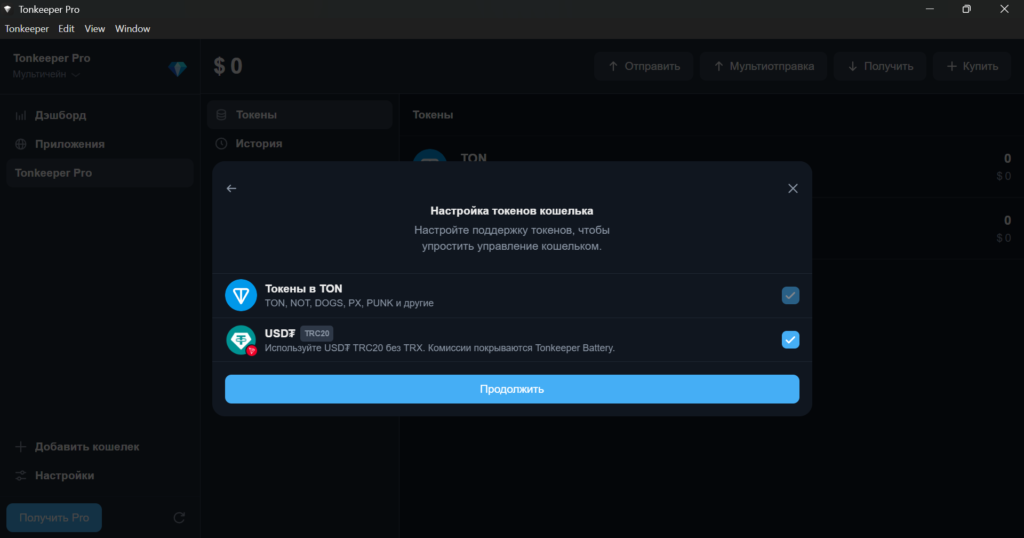
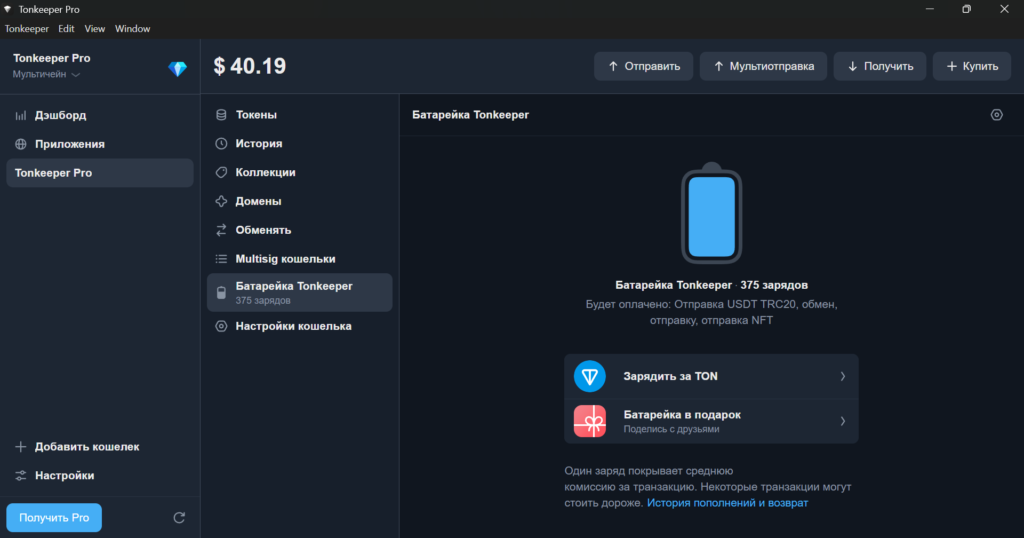
Battery charges can be bought with TON, as well as with Notcoin (NOT), DOGS, CATI and other tokens.
In the documentation the Tonkeeper team recommends topping up Battery by at least $3, otherwise the purchase will not go through. The developers also note that a single USDT (TRC-20) transfer requires roughly 250 charges, though this can vary significantly depending on market conditions.
We chose the “Charge with TON” option, set 375 charges for 1.15 TON ($3.35) and confirmed the transaction. Battery charged for 20 seconds.
For the test we funded the TRON address with 20 USDT. We then clicked “Send”, entered the recipient’s address and the amount. The wallet calculated 185 charges as the fee for sending funds to a wallet with USDT.
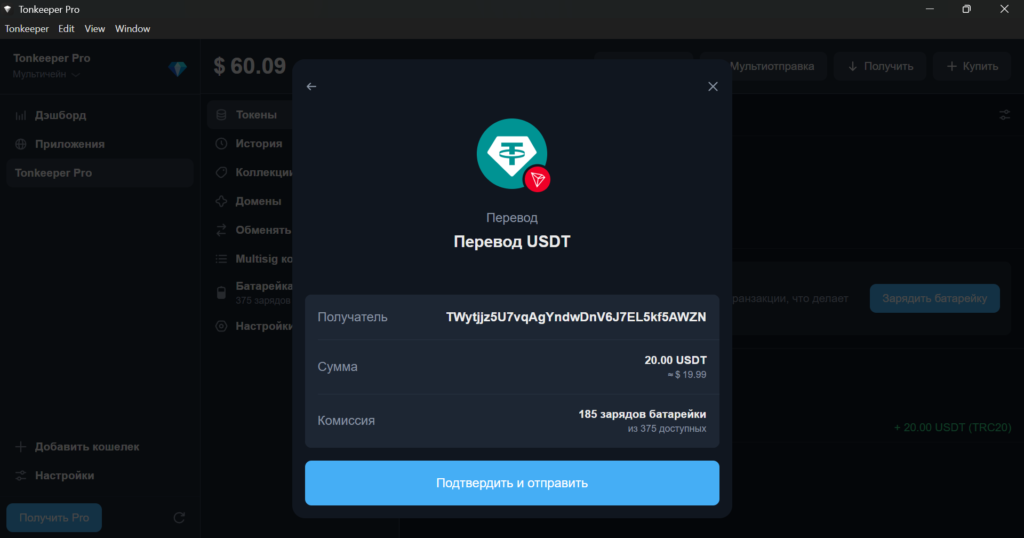
In practice we spent slightly less — 182 charges (0.558 TON or $1.63). For comparison, sending USDT on TRON will cost $3 (if the recipient already has USDT) or $6 (when sending to an “empty” address).
Unused charges can be refunded within 14 days from purchase. To do this, go to the Battery page, then “Top-up history and refund”. In the Tonkeeper Pro browser you need to connect to bat.tonkeeper.com and click the Return Charges button.
Subscribing and testing bulk sending
Creating a multisig wallet and using bulk sending requires a subscription. To test the Pro features yourself, you can enable a one-month free trial. To do this:
- click “Get Pro” in the bottom-left corner of Tonkeeper Pro;
- select “Try Pro for free”;
- in the window that appears, enter the phone number linked to your Telegram account. Tonkeeper Pro needs this to protect against bots;
- confirm the connection to the wallet via Telegram.
After connecting, the wallet interface switches to the Pro theme in yellow and black. To purchase a subscription:
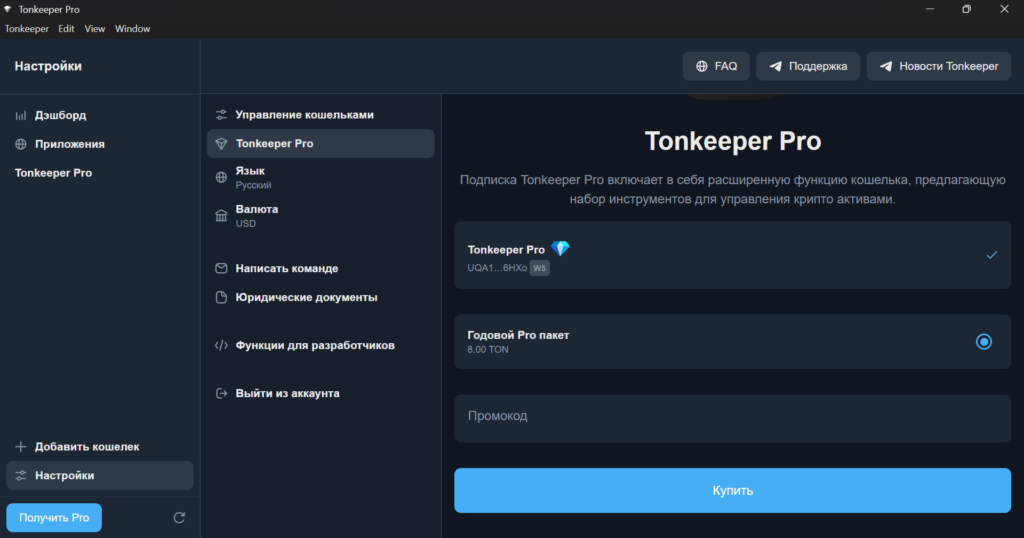
- open settings and select the Tonkeeper Pro option;
- if you have a promo code, enter it. At the time of writing, users can receive a 10% bonus to Battery charges via Cointelegraph Crypto Bonus;
- click “Buy” and confirm the transaction (8 TON at the time of writing).
After subscribing, we tested the bulk token sending feature:
- in the top menu we clicked “Bulk send” and created a new list;
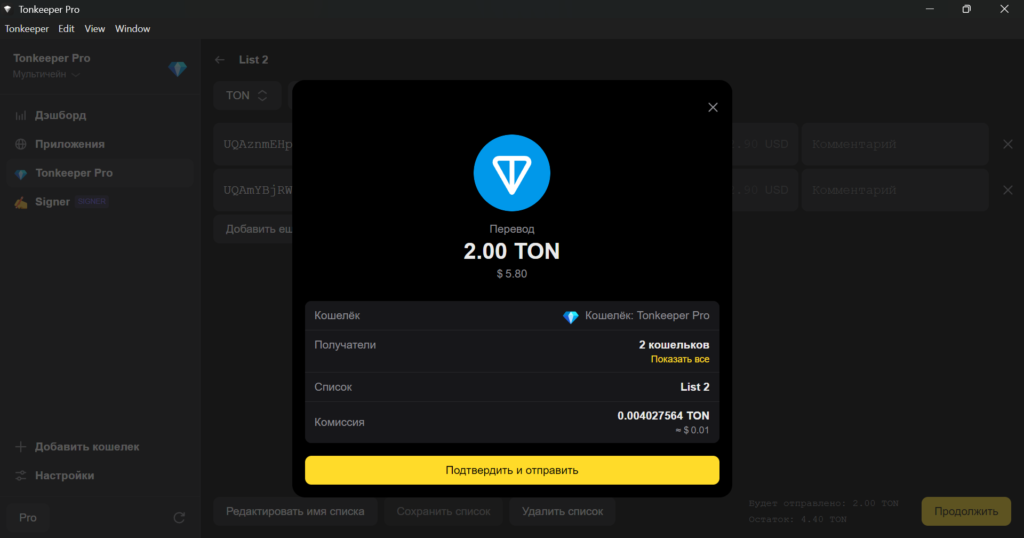
- we specified two recipient addresses and token amounts for each (1 TON apiece). We will use them later to create a multisig wallet;
- we confirmed the transaction.
The transaction fee was only 0.004 TON (about $0.01). Besides TON you can send any tokens on The Open Network blockchain. The list can be saved or edited — handy for regular mass payouts such as salaries. The developers add that a list can be imported in CSV format from Excel, Google Sheets and other spreadsheet editors.
Creating a multisig wallet
A multisignature wallet can be managed by several participants. When creating one, the user sets:
- the total number of keys (n);
- the quorum required to sign a transaction (m-of-n).
For example, the industry-popular 2-of-3 scheme means there are three keys, but any two of them are needed to spend funds.
«As a rule, each key is owned by a separate person — a co-owner of the wallet. The 2-of-3 format means that to send a transaction at least two of the three participants must confirm it», — поясняют в Tonkeeper.
To create a multisig setup, go to the “Multisig кошельки” section and then “Новый Multisig кошелек”. To configure it you only need the addresses of the other signers.
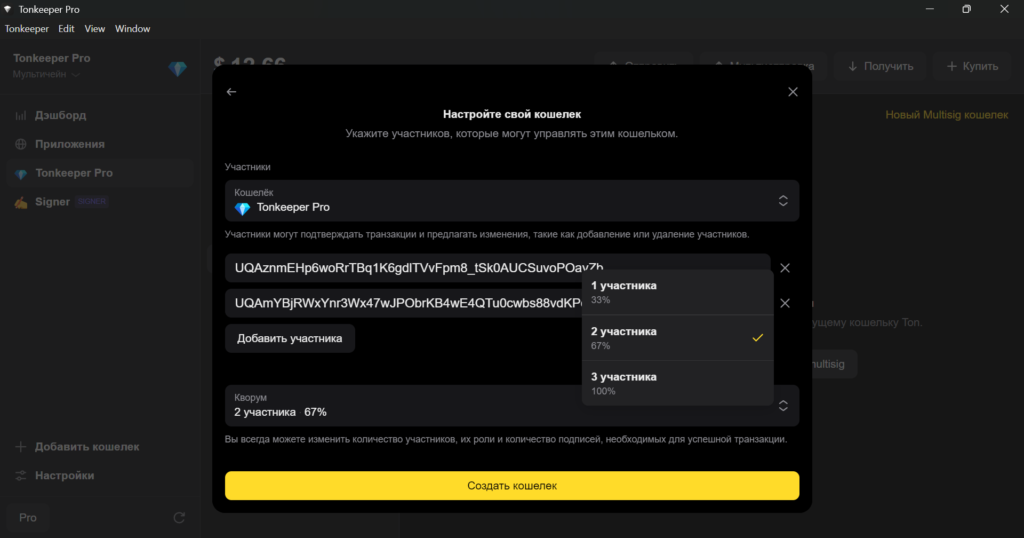
We specified the addresses and the quorum — two participants (67%). When choosing a setup with a single signer or with three or more (100% agreement), it is important to consider the risks. In the first case any party can unilaterally spend all of an organisation’s funds. In the second, access to funds will be lost permanently if even one participant loses their key.
2-of-3, 3-of-5 and similar schemes are a balanced solution: no single party has full control, yet losing one or more keys does not lead to loss of access to funds.
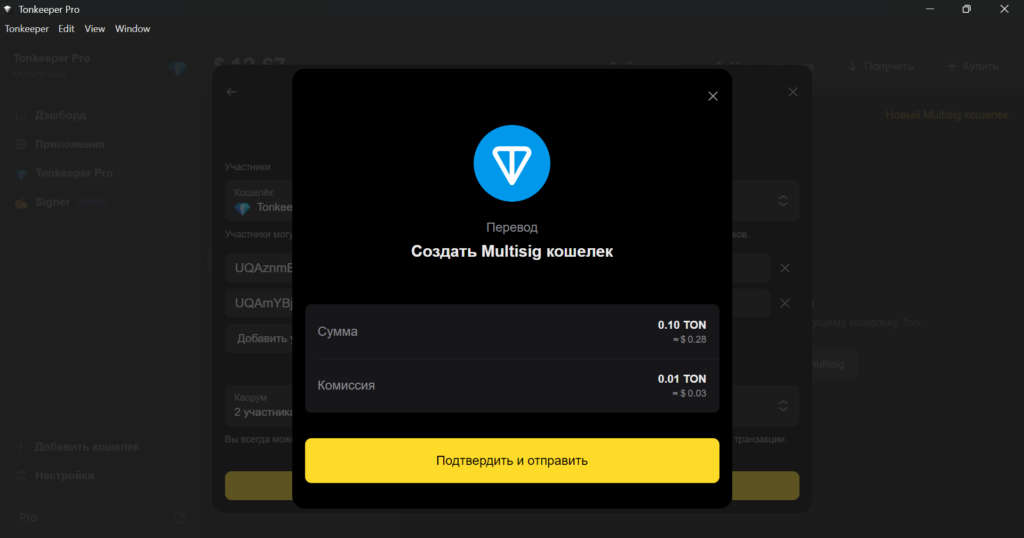
After confirmation, Tonkeeper Pro will generate the multisig wallet and send 0.09 TON to it.
«Subsequently, it does not matter who created the wallet — this gives no privileges. All signatures are equal», — отмечают в Tonkeeper.
To sign transactions with a multisig wallet, create a request and set a signing window, then specify the recipient address, token and transfer amount.
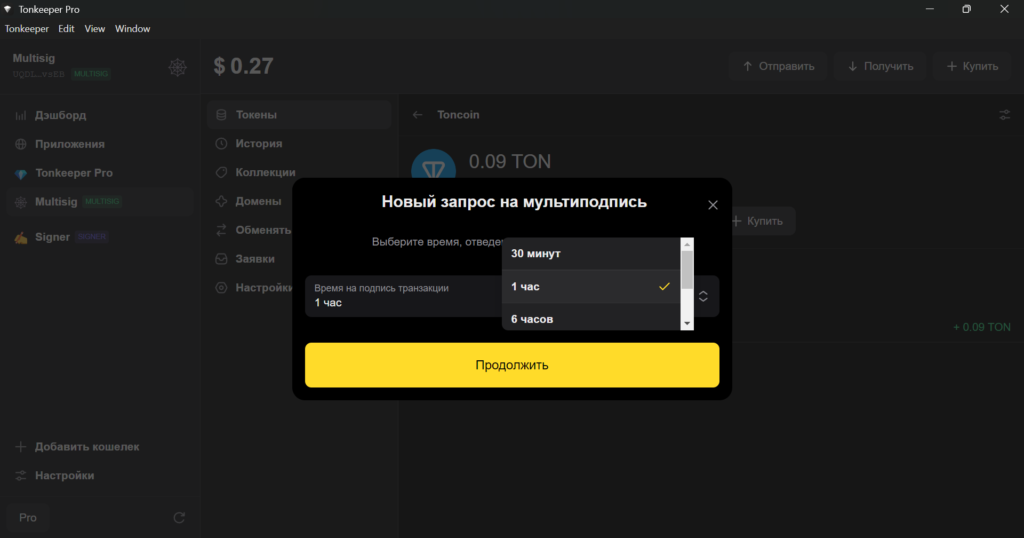
The timer starts from the first signature. The request becomes invalid if it does not receive the required number of confirmations within the set period.
Once the quorum is reached, Tonkeeper Pro will automatically send the funds to the recipient’s address.
«A multisig wallet can do everything a regular one can: send TON, tokens and NFTs, make swaps, connect to decentralised applications via TON Connect and confirm operations. The key difference is that each on-chain action is formatted as a request that several participants must approve», — объясняют в Tonkeeper.
The current guide to creating a multisig wallet is on the Tonkeeper website.
Conclusions
Tonkeeper Pro is an enhanced version of the popular TON wallet Tonkeeper. It was previously available only on desktop, but in May the developers added iOS support and offered a three-month free trial. To activate, tap “Continue with Pro” in the app.
Users can pay for USDT (TRC-20) transactions in the TON network using the Battery service. In our case, the fee was lower than on TRON, though the developers note that the final cost depends on various market factors.
For additional security, two-factor authentication can be enabled — transaction confirmations will happen via Telegram.
Companies and organisations can purchase an annual subscription for just 8 TON (~$24) to access Pro features: multisig wallets, an expanded dashboard for transaction analysis and lists for mass payouts.