



Whale watching: how to profit from big players’ moves, according to Whalepro
Whales control thousands of bitcoins and move the market with their trades. Yet most traders struggle to use data on this activity effectively. It is often hard to discern big players’ motives and turn them to one’s advantage.
In this article the developers of the analytics platform Whalepro explain how to analyse bitcoin whales. A ForkLog promo code sits at the end.
Why track whales
By Whalepro’s estimate, a bitcoin whale is any wallet holding from 500 BTC. The largest is attributed to Satoshi Nakamoto — about 1m coins — but those funds have not moved for more than 15 years and offer little practical value for analysis.
Different categories of whales have different aims. Exchanges accumulate bitcoin for price control and liquidity. Miners care about fees and block rewards. Large investors and funds use bitcoin for diversification. States are exploring digital gold as a new asset class.
Almost all whales share one goal: profit. They are not interested merely in selling coins at a gain. Most treat bitcoin as working capital in a “sell — buy back cheaper — pocket the spread” loop.
The basic script varies: steady accumulation on dips, partial sales as price rises, long-term holding with periodic adjustments. The essence is the same — earn on volatility rather than simply sit on the asset.
The crux of whale analysis is not spotting the fattest balances. It is tracking activity and interpreting it correctly.
“Most traders mistakenly think it is enough to find wallets with large balances. In reality, the key to success is understanding the logic of specific whales’ actions and being able to interpret their signals in market context,” say Whalepro representatives.
That requires solving two linked tasks: quickly finding whales by parameters and analysing their moves properly.
Filtering whales
Bitcoin’s blockchain is an open database, but without specialised tools analysis is nearly impossible. To find whales you need convenient filters to surface wallets by set criteria.
The analytics platform Whalepro offers more than 15 filters, grouped by category. They let you search whales by balances and transactions, activity, financial results and behaviour over chosen periods.
“We deliberately built the filter system like an online shop — criteria on the left, results on the right. This approach helps even novice analysts quickly find the right whales without deep technical knowledge,” the platform’s creators say.
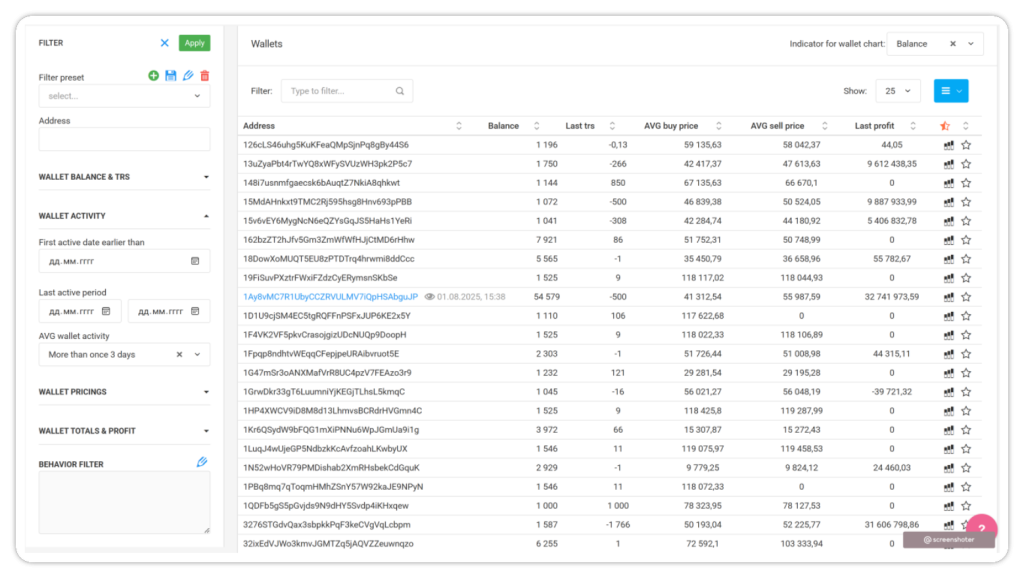
Balances and transactions
The first group of filters concerns wallet size and operations. Wallet balance shows the amount of bitcoin at the time of the latest transaction. This is the basic filter — a floor of 500 BTC typically isolates genuinely large players.
Last transaction size shows how much the whale moved last time. This helps gauge the scale of current activity. If a 2,000 BTC wallet last moved 10 BTC, it may have been a technical operation. If it moved 800 BTC, that is more likely a serious trading decision.
Average transaction size is calculated separately for inflows and outflows. The system totals bitcoins moved and divides by the number of transactions. This is useful for assessing typical transfer sizes.
Wallet activity
First activity date helps find older wallets that appeared in bitcoin’s early years. Such addresses often belong to seasoned players with deep market understanding. The filter lets you set a cut-off date for the first transaction.
Last activity period is useful for spotting whales active before or after key market events. For example, you can find wallets that moved funds ahead of a sharp rise or fall.
Overall average activity shows how regularly a whale transacts. The system compares days since wallet creation with active days (transactions of at least 1 BTC). If a wallet is active at least once every three days, it receives a high activity score.
Estimating buys and sells
This group relies on an important assumption: when a wallet’s bitcoin balance decreases, the system treats it as a “sale”. When the balance increases — as a “purchase”.
“Of course, in reality we do not know exactly where the whale trades, but without such assumptions it is impossible to calculate profitability metrics,” Whalepro explains.
Average buy price shows the rate at which the whale built its position. The system sums funds spent and divides by the current amount of purchased bitcoins on balance. Average sell price is analogous — total proceeds are divided by coins sold.
Average asset cost reflects the current valuation of bitcoins on the wallet. Purchases add a positive value; sales a negative one. Dividing total cost by the wallet balance yields the average asset price.
Financial results
Total spending shows how much money the whale spent on purchases. This rises only on buy transactions, when the wallet owner pays to acquire bitcoin.
Total income reflects revenue from selling digital gold. It rises only on sell transactions, when the whale receives money for coins sold.
Difference between income and spending gives the wallet’s overall financial result. A positive value indicates profit; a negative one, a loss. The system also calculates profit from the latest transaction and cumulative profit across all operations in the database.
Behaviour over time
This filter lets you search wallets by balance changes over chosen periods. You can select up to two time windows and specify the direction — accumulation or selling.
For instance, you can find whales that accumulated in May–June and then sold actively in July. Or wallets that trimmed positions ahead of important events.
A practical case: finding whales before a correction
Here is “whale watching” in practice. We will find wallets that reduced balances from 14 to 31 July 2025 — before bitcoin’s correction from above $120,000 to $95,000.
“The hypothesis is simple: we are interested in wallets that sold before the drop. We will use several filters, but focus on behavioural analysis — searching for active wallets that cut balances by 20% or more over the period,” Whalepro comments.
Setting basic filters
We started with wallet balance — a minimum of 500 BTC. This parameter strongly affects how many results you get. The lower the threshold, the more wallets appear. We need large players capable of moving the market.
We set the first activity date to before 1 January 2025 — a reasonable compromise to find wallets with relevant history.

We chose overall average activity of “more than once every 3 days”. We need trading whales — wallets that transact regularly so their signals stay relevant.
Configuring the behaviour filter
The crucial step is configuring the behaviour filter. The process involves several steps and requires working with the chart.
First open the behaviour filter settings. A bitcoin price chart appears, where you can mark the periods.
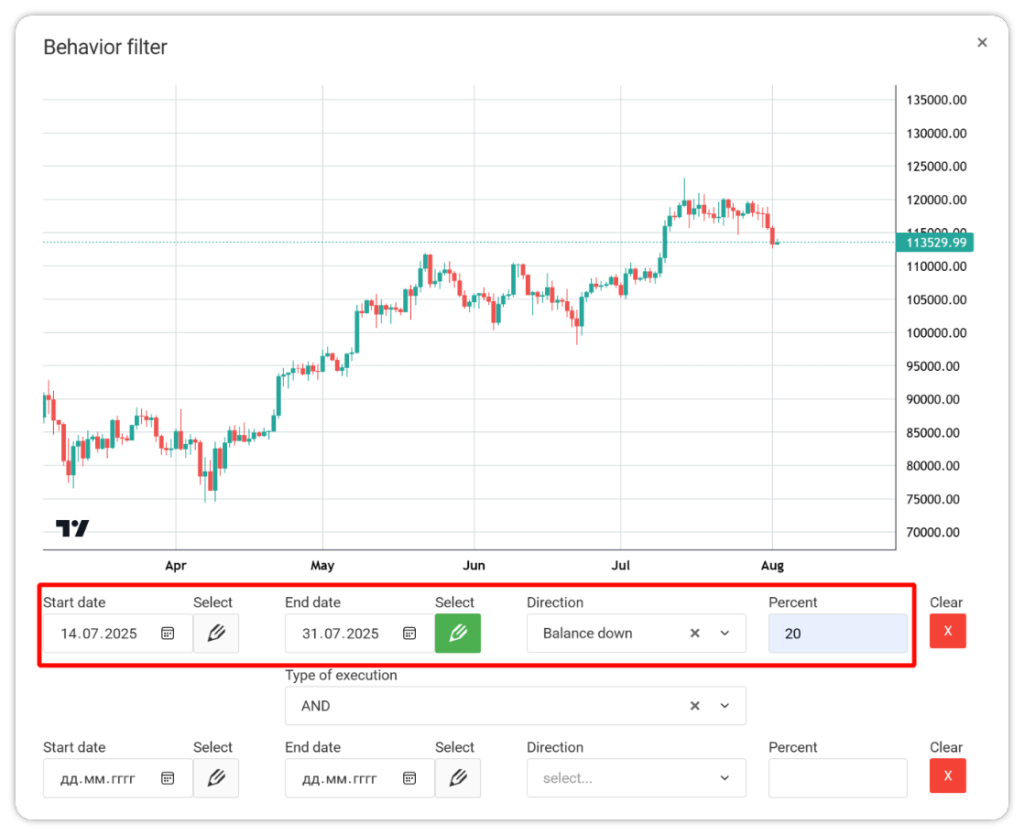
In the Start date field, click the activation icon, then select 14 July. Set the end date to 31 July.
In the Direction field choose Balance down. In Percent enter 20% — we are looking for wallets that cut positions by at least a fifth.
After saving, the filter displays as “2025-07-14 > 2025-07-31: 20% down”. Apply all filters to get the list of matching wallets.
Analysing the results
The system found 10 wallets that met all criteria. Each can be quickly assessed by its balance chart. One address stood out: bc1qu97pnw3arh9gslvt84r3h8rzv2q7ssaevaq5ay.
This whale behaved exactly as our hypothesis suggested. From the first week of June it steadily increased its balance to a local peak of about 2,865 BTC — an accumulation phase ahead of important events.
From 14 to 16 July the wallet slashed its position by 79% — from 2,865 to roughly 600 BTC. The sales occurred when bitcoin traded above $120,000, before the serious correction began.
Such behaviour points to an informed owner. The whale not only locked in profits at high levels but prepared in advance by accumulating at lower prices.
Tracking wallets
After identifying such wallets, set up continuous monitoring. Add the best whales to favourites and configure Telegram alerts.
To save a wallet, click the star next to its address.
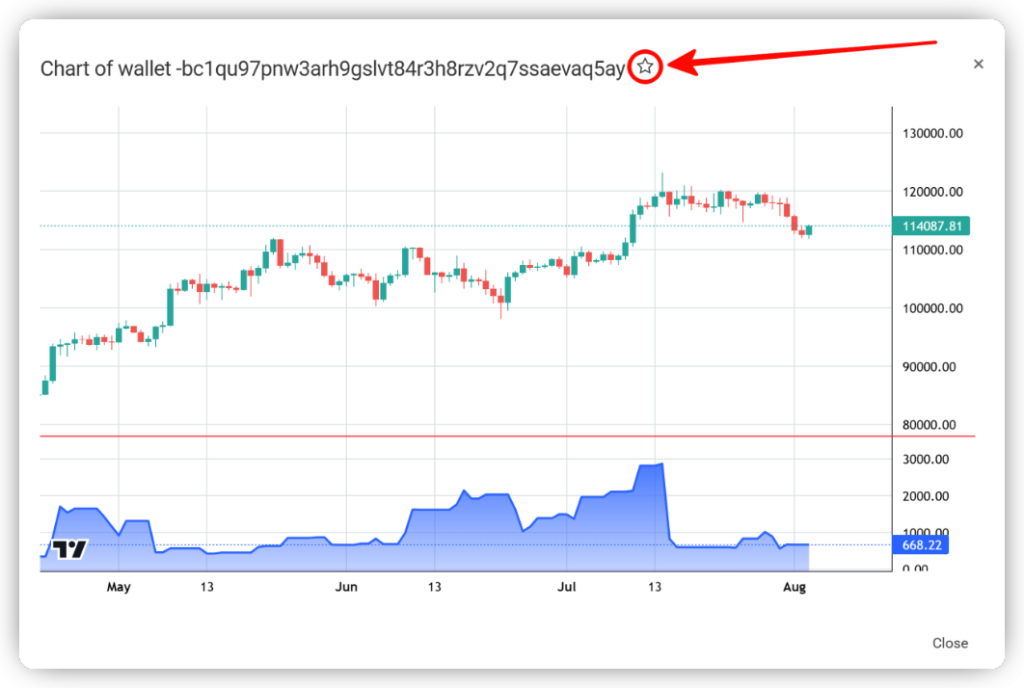
A window opens where you can add a note summarising the whale’s strategy.
“Label each wallet with a clear name that reflects its features or strategy. This will help you navigate when tracking many addresses,” Whalepro recommends.
After saving, the wallet appears in the My wallets list section, where you can monitor saved whales, quickly view charts and manage alerts.
Setting Telegram alerts
To receive signals in Telegram, subscribe to the dedicated bot. The bot link is available in the header of Whalepro.
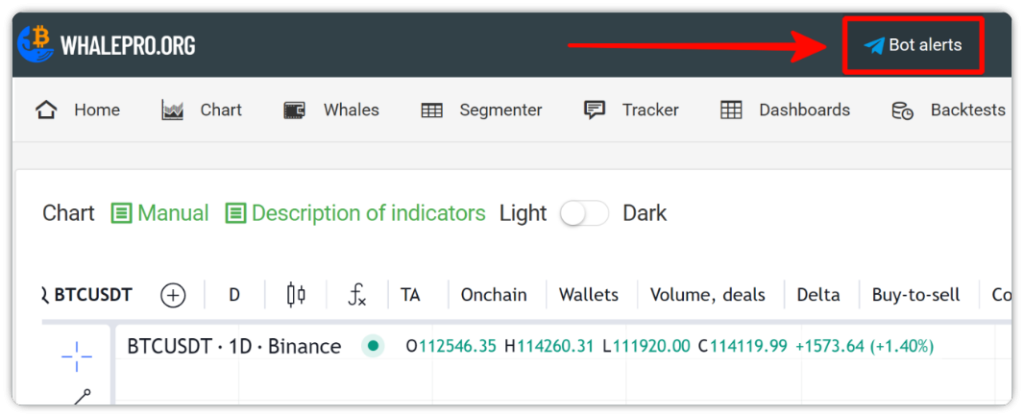
Once subscribed, you can set alerts for movements of specific wallets. On the chart page, find the BTC wallet balance indicator in the Wallets menu.
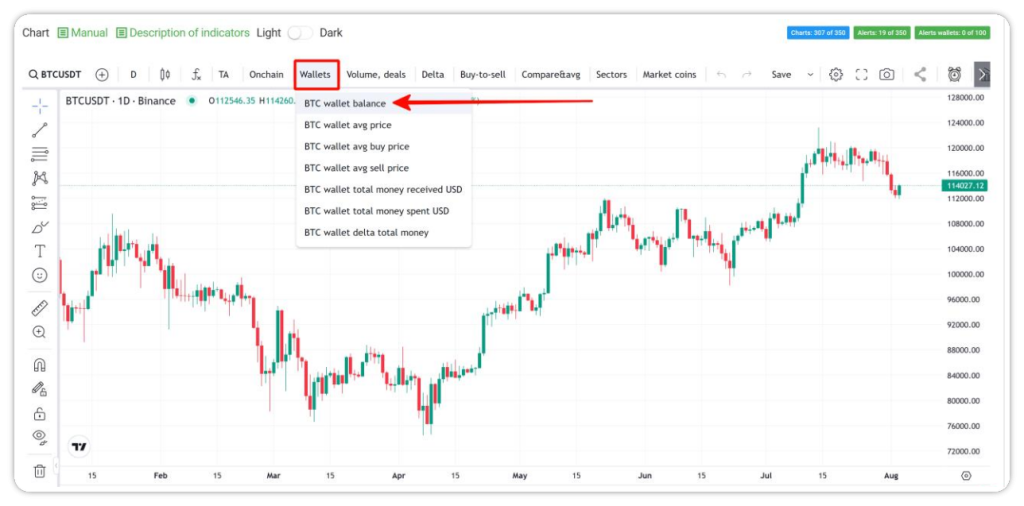
After adding the indicator to the chart, open its settings. In the wallet list, choose the address of interest — for example, the same bc1qu97pnw3arh9gslvt84r3h8rzv2q7ssaevaq5ay.
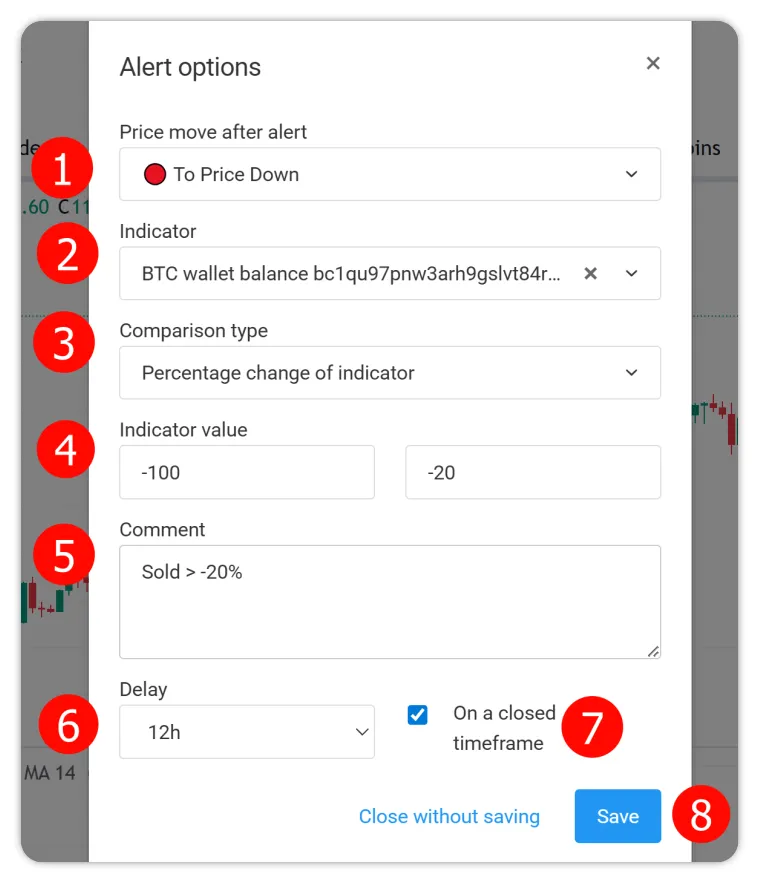
The chart will automatically display the balance history of the selected wallet. When creating an alert, set the following parameters:
- The forecast direction determines the expected impact on price — rise or fall after the signal triggers. If the whale typically sells before corrections, choose To Price Down.
- Select the balance of the wallet displayed on the chart.
- For comparison type, choose “percentage change of the indicator”. This tracks relative balance changes rather than absolute BTC amounts.
- Enter the value range. For example, from -100% to -20% means the alert will trigger on any balance decline from 20% to a zero balance.
- A comment helps you recall the alert’s logic. Sold > -20% — an example of a brief description of the trigger conditions. This text will arrive with the notification and helps you grasp the signal quickly.
- Delay sets the minimum interval between notifications. “12 hours” means a maximum of two alerts per wallet per day. This prevents spam from frequent small moves.
- Be sure to enable the “on a closed timeframe” option; otherwise the system will analyse unfinished periods, which may cause false triggers due to interim data changes.
- Do not forget to save the alert.
After configuration, subscribe to Whalepro’s Telegram bot, which will send a notification every time the tracked wallet acts per your parameters.
“After that, you decide how to react. If you trust the signal, you can mirror the wallet’s operations. For greater reliability, set up 20–30 alerts — that way you increase confidence in your actions,” Whalepro recommends.
You can integrate whale-movement data into your own trading strategy and watch for confluence with other indicators.
Interpreting signals and putting them to work
Simply copying whales is not a great strategy. Interpret signals correctly and place them in broader market context.
Sell signals often look like a sharp balance reduction over a short period. They are especially telling when several whales sell at once, or after a long accumulation.
Buy signals often appear as gradual balance increases on pullbacks. Whales rarely buy in one lump sum; they tend to build positions in tranches, using price dips.
Context matters. If a whale sells after a 50% rally, it may be profit-taking. If sales come at local lows, the whale may have other motives.
“A whale may sell not because it expects a drop, but for portfolio rebalancing or technical reasons. Therefore we always recommend analysing behaviour patterns, not single transactions,” Whalepro analysts warn.
Each whale may have its own logic around large sizes. The bigger the position, the more scope for averaging, hedging and complex strategies. What looks like a loss to a retail trader can be part of a profitable scheme for a whale.
Remember — bitcoin does not vanish in a transaction. If one wallet sold at a good price, someone else bought. The buyer may have been less lucky — or simply following a different plan.
For statistically meaningful results, track 20–30 wallets at once. Single signals may be noise; broad whale activity usually points to important shifts.
Conclusions
Whalepro is a useful tool for supplemental trading signals. Well-tuned filters help find wallets with predictable behaviour, and automated alerts ensure you do not miss important moves.
Free registration on Whalepro unlocks the Wallets page. For convenient management of many alerts, you can add the paid Starter plan at $12 per month. When you activate it with the promo code forklog2025, you get an extra month for free.
Рассылки ForkLog: держите руку на пульсе биткоин-индустрии!