


How to Protect the Privacy of Your Messages: Top 5 Private Messengers
The year 2022 is rapidly turning into a year of censorship: Russian authorities block independent media, ban certain words, and bring criminal charges after unlawful wiretapping of telephone conversations.
Can we preserve privacy and why Telegram certainly won’t help in this? We spoke with IT security expert and CEO of Security Services Group, Yuri Melashchenko.
What’s wrong with Telegram
Belief in Telegram’s security largely rests on Pavel Durov’s refusal to hand over keys to decrypt users’ correspondence to the FSB.
However the messenger does not encrypt messages by default, even WhatsApp does. End-to-end encryption can be enabled manually and only in private chats.
“Regular chats and group chats are not protected by end-to-end encryption, meaning Telegram can access your conversations, and moreover — it stores them on its servers. If you use this messenger, create ‘secret chats,’ enable auto-delete, and forbid screenshots. But remember that even these restrictions can be bypassed with a second phone equipped with a camera,” explains Yuri Melashchenko.
No one can guarantee that the contents of ordinary chats won’t fall into third parties’ hands. Telegram’s server code is closed: you won’t be able to verify its security.
Accounts can be created only using a phone number. This enables attackers to intercept SMS for logging into accounts and link users together.
The messenger remains popular thanks to its intuitive interface and breadth of features. However, in terms of security and privacy it has several credible alternatives.
Five encrypted messengers
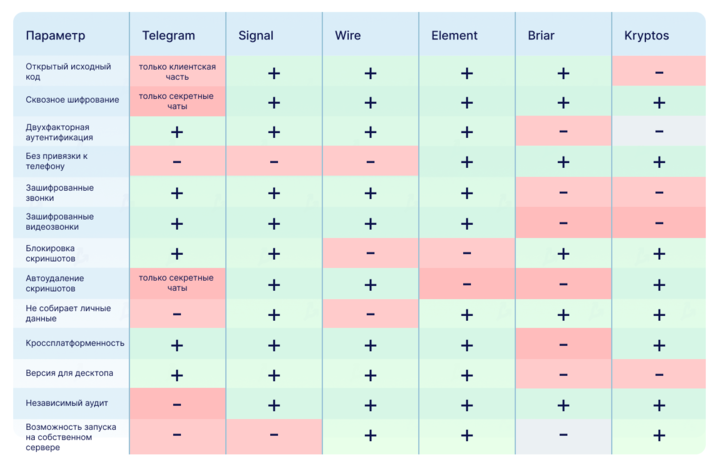
There are many criteria. We selected the core ones: a free version, end-to-end encryption, open source, two-factor authentication, encrypted calls, auto-delete of messages.
“These are the essential parameters. Beyond them, factors like the ability to deploy on your own server, resistance to MITM attacks and Cellebrite UFED, Elcomsoft, Oxygen Software come into play,” says Yuri Melashchenko.
“Such toolkits enable access to device data, including remote files and chats. Just turn on airplane mode and open the messenger: everything you see can be extracted,” comments the CEO of Security Services Group.
In this article we review five free messengers that meet all or most of the criteria listed above.
1. Signal — an open-source messenger from Open Whisper Systems. The project team developed a protocol used by WhatsApp as well.
All chats and calls in Signal are protected by end-to-end encryption. Users can set auto-delete of messages and login with a PIN. The service has undergone several independent audits.
“Signal is regarded as the most secure messenger. But it isn’t without flaws: you must register with a phone number and trust the server owner who holds the encryption keys. We’ve tried deploying our own server a few times, but the attempts didn’t pan out,”
“The messenger shields users better than Telegram: if an attacker intercepts an SMS, they won’t gain access to chat history — it isn’t stored on Signal’s servers. It is stored on the device, so setting a PIN for the app helps protect data if the phone or computer password is guessed,” remarks Yuri Melashchenko.
Platforms: iOS, Android, Windows, Mac and Linux.
2. Wire — a messenger with end-to-end encryption, self-destructing messages and open source.
The developer is the Swiss company Wire Swiss—primarily targeting the corporate market, though a free Wire Personal version is available for individuals.
To create an account you’ll need personal information: a phone number or an email address. Wire’s security audits were conducted by Kudelski Security and X41 D-Sec.
Platforms: iOS, Android, Windows, Mac, Linux and Web.
3. Element — an open-source, decentralized messenger. It uses the Matrix open standard developed by The Matrix.org Foundation in the UK.
The service allows creating anonymous accounts and sending messages to other messengers. All chats and calls in the app are end-to-end encrypted.
Users can connect to existing servers and create their own. The latter may be a drawback if the server owner misconfigures it or mismanages its operation.
Platforms: Android, iOS, Windows, Mac, Linux and Web.
4. Briar — a P2P messenger for Android with open-source code. By default uses Tor network, but when there is no internet connection it sends messages via Wi‑Fi or Bluetooth.
Users can chat in rooms, private groups and forums, and also run blogs. Registration requires a username and a password.
Contacts must be added manually — via QR codes or invitation links. If you delete the app or forget login data, you will lose access to your chats.
Drawbacks of Briar include support on only one platform, higher battery drain and message delivery only when both users are online. Also, Briar does not allow re-adding the same contacts via new links, suggesting a centralized database.
Platforms: Android.
5. Kryptos Private Messenger — a messenger with end-to-end encryption, anonymous registration and private external links. It supports a “double bottom” feature: a user can create two accounts and log into them with different passwords.
The Kryptos server does not participate in key distribution. The messenger creates a key pair for each user and stores them on the device in encrypted form. This approach makes a man-in-the-middle attack impossible.
Users’ messages reside in volatile memory and are automatically deleted when the app is minimized, so they cannot be read if someone gains physical access to the phone or computer.
The messenger uses its own virtual keyboard and Fortuna pseudorandom number generator, created by Bruce Schneier and Niels Ferguson. It reads data from the gyroscope, timer and user input to thwart potential vulnerabilities of system PRNGs.
“The virtual keyboard is an additional countermeasure against UFED devices. Built-in keyboards remember every word you have ever typed on the device. With access to the phone you can obtain this dictionary, even if you used a fully encrypted messenger,” says the CEO of Security Services Group.
Kryptos Private Messenger is in an early development stage: it supports text and voice chats, file sharing, private chats and groups.
At present the Kryptos team is seeking investment to build a federated server system and a private cryptocurrency.
Developers plan to add voice calls, refine the interface and fully open source the app.
Platforms: iOS, Android and Web.
General tips for digital security
- Download apps only from official stores, and choose those with end-to-end encryption.
- Don’t share unnecessary information about yourself: register accounts with virtual phone numbers and disposable email addresses. If you use real data, make the profile visible only to your contacts.
- If you receive a message from an unfamiliar account, be sure to call back to confirm the person’s identity.
- Don’t click links or download files, even if sent by a friend. Check by phone or in another messenger whether it really was them.
- Disable cloud backups of chats — not all apps store them encrypted.
- Set a PIN or password to access the messenger. Enable two-factor authentication if supported.
- Do not send sensitive information via messengers. You can’t be sure the other party will delete it, and third parties may have access.
Read ForkLog’s bitcoin news on our Telegram — cryptocurrency news, prices and analytics.
Рассылки ForkLog: держите руку на пульсе биткоин-индустрии!